fit
Work has a pattern. Life has plans.
Your shifts, sorted.
Your time, back.
Describe the shifts you actually work. Check what we understood. Export 12 weeks to Apple, Google or Outlook — no account needed.
12 weeks free · No account needed · Your draft stays on your device
Need more than calendar export?
Start by getting the rota you already work into your calendar. If you also want to explore reduced hours or a different pattern around childcare and other commitments, FlexiPlan can help you compare options afterwards.
Your saved five-week template needs a check.
An earlier version had a shortened sequence. Your draft has been kept unchanged. Choose the corrected 35-day example again and check it against your roster before exporting.
Choose your starting point
What would you like to do?
Pick one route to keep things simple. You can switch at any time.
Existing sector templates and previous calendar tools
Get my shifts into my calendar
Your shifts, ready to go.
Choose your rota. Check the dates. Take it with you.
VSA setup
Choose a starting pattern for your VSA
A VSA sets locally agreed working hours; it does not prescribe one national repeating rota. Choose the sequence you actually intend to calendar.
Add your own repeating pattern
Use D for day, B for back/late, N for night and O for a day off.
D Day
B Back / late
N Night
D Day · Fri/Sat
B Back / late · Fri/Sat
N Night · Fri/Sat
12-week calendar files are free. Six- and twelve-month purchases remain closed until payments launch.
Your calendar file is ready
Open or save the file, then import all shifts into your calendar.
Published patterns can change by role, team and location. Always compare the preview with your current roster before importing.
Rota setup
Your working pattern
Free previewTry one scenario at a time. Saving rotas, longer exports and household planning are member features.
Rota output
Your pattern will appear here
Waiting for pattern
Start with your real working arrangement
Enter an existing rota or choose to build one. Nothing is assumed until you tell the app how you work.
Create a free 12-week calendar file. Six- and 12-month files are not available yet.
Your calendar file is ready
Open or save the file, then import all shifts into your calendar.
Contract—weekly average
Pattern—scheduled average
Repeat check—calendar alignment
Commitments—kept clear
Calculation check
Hours and pattern
Calendar view
Planning aid only. Confirm paid breaks, contractual rules, minimum rest, staffing cover and employer approval before relying on a proposed pattern.
About Sort My Shifts
Two jobs: calendar fast, planning properly.
Sort My Shifts is for nurses, emergency-service workers, transport and security teams, hospitality staff, manufacturing workers, families and anyone whose working hours do not fit a simple Monday-to-Friday week.
Shifts to mobile
Put a rotating pattern on your calendar.
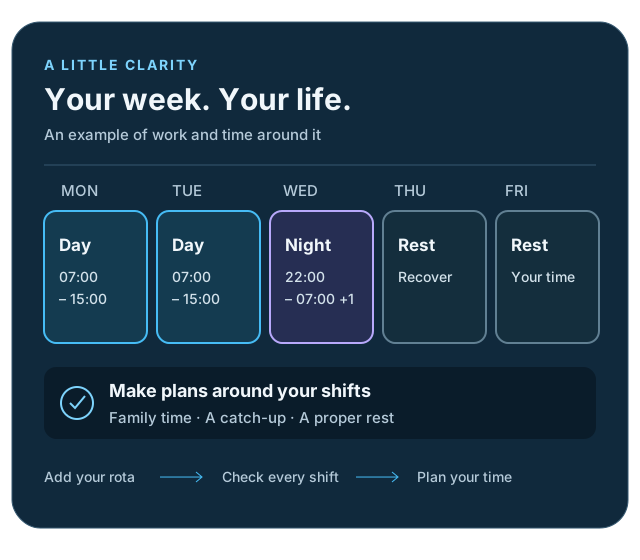
Type your rota in normal words, choose the first date, check the preview and export a calendar file you can import into Apple Calendar, Google Calendar or Outlook.
Flexible working builder
Try the change before you ask for it.
Test reduced hours, dropped shift types, protected days and life commitments. The builder shows where the hours move, what clashes, and what still needs employer approval.
Membership · opening soon
Why join Sort My Shifts?
Keep the free tools you already use, with the convenience of a secure account once membership has completed its private trial.
No payment is taken. Public membership is not open yet.- Save several rotasKeep patterns and life commitments ready for next time.
- Move between devicesOpen your saved plan on your phone, tablet or computer.
- Longer calendarsCreate longer calendar periods when the member service opens.
- Keep controlAccount export and deletion controls are being tested before launch.
Getting started
Questions people ask before trying it
Practical answers about entering, checking and exporting your rota.
Is Sort My Shifts free?
Yes. You can build or change a rota and create a 12-week calendar file without paying or making an account.
Do I need an account?
No. The free calendar and flexible-working tools work without an account. Membership is still in private testing.
Which shift patterns can I use?
You can use a listed pattern such as Police 2-2-2, Old VSA, five-week VSA and common nursing patterns, or enter your own repeating rota.
What if my rota is not listed?
Choose “Start with words” or build a custom pattern. Enter day, late, night and rest days in the order they repeat.
Which start date should I enter?
Enter the date of the first shift in the repeating pattern you have chosen—not necessarily today. Check the preview against a rota you know is correct.
Can I change the suggested shift times?
Yes. Check and edit each shift’s start and finish time before previewing. You can also use different Friday or Saturday times.
Does it understand overnight shifts?
Yes. If a night shift finishes earlier on the clock than it starts, the finish is treated as the following day.
Can I change just one shift or rest day?
Yes. Preview your rota, select the individual day and add a one-off change. The repeating pattern stays unchanged.
How do I put the rota on my phone?
Create the free calendar file, then open or import the .ics file in Apple Calendar, Google Calendar or Outlook. Your phone may ask which calendar to use.
Will later changes update my calendar automatically?
No. The downloaded file is a snapshot. If your rota changes, make a new file and check for duplicate events before importing it.
Can I export more than 12 weeks for free?
Not at present. The free export covers 12 weeks. Longer calendar periods are planned for membership, which is not open yet.
What does the flexible-working planner do?
It helps you explore hours, shift changes, protected days and childcare or other commitments. It produces planning options—not employment, legal or HR advice, and not employer approval.
What if the hours I want cannot fit?
The planner explains the shortfall or conflict instead of pretending the plan works. You can then change the hours, available days or shift limits and compare another option.
Is my rota uploaded anywhere?
The current free planner keeps its draft in this browser and makes calendar files on your device. Avoid entering names of children or confidential employer information.
Can it read a photo or screenshot of my rota?
Not yet. Enter the pattern using words, a shortcut, a listed pattern or the custom builder.
Can I compare my rota with my partner’s?
Not yet. Partner and household planning is being developed and will only open after privacy, consent and account testing are complete.
YOUR WEEKWORK + LIFE
MON07:00Day shiftSchool run
TUE14:30ChildcareRecovery
WED22:00Night shiftSchool run
THUOFFSleep + reset
Work Life commitments Recovery
Life doesn't run on a standard rota
There’s more to your week
than work.
School runs. Recovery after nights. An evening that’s actually yours. Add your commitments to the change planner and see what fits.
Invited Pro Beta members can try partner planning with explicit sharing. Public access remains closed.